
Processing Physical Product Orders
Not everything you sell arrives by e-mail. A paperback, a mug, a set of bookmarks, a shirt — BookFunnel takes the money for those and you send them.
What makes a product physical
Nothing in the script tag on your site. It is a setting on the product itself: a product either includes BookFunnel books or it does not. One that does not is self-fulfilled, and three things follow automatically.
- No delivery promise. The checkout does not show "Delivered by BookFunnel" — because BookFunnel is not delivering it. That mark is a claim, and it has to be a true one.
- No delivery fee. BookFunnel takes its transaction fee and no delivery cut, because there is no delivery to cut.
- The format leads. The button reads "Buy the Paperback", and the line in your sales list reads "Paperback: Love Stuck". The single largest source of angry mail in this business is a reader who thought $4.99 bought them a physical book, so the format is put where it has to be read before the price is.


What is yours to do
- Pack and post it. BookFunnel never sees the item. Your shipping, your carrier, your timeline.
- Say what your timeline is. Use the product's seller note for it — "signed and posted within a week, UK and EU only" — because it appears in the checkout, before the buyer pays, which is the only moment it can stop a complaint rather than answer one.
- Price the postage in. There is no separate shipping charge at checkout. Whatever postage costs you has to be inside the price you set.
- Answer the refund request if one comes. A physical order refunds through exactly the same flow as an ebook, and on the same clock — see Handling refunds. Getting the item back is between you and the buyer; BookFunnel's part is the money.
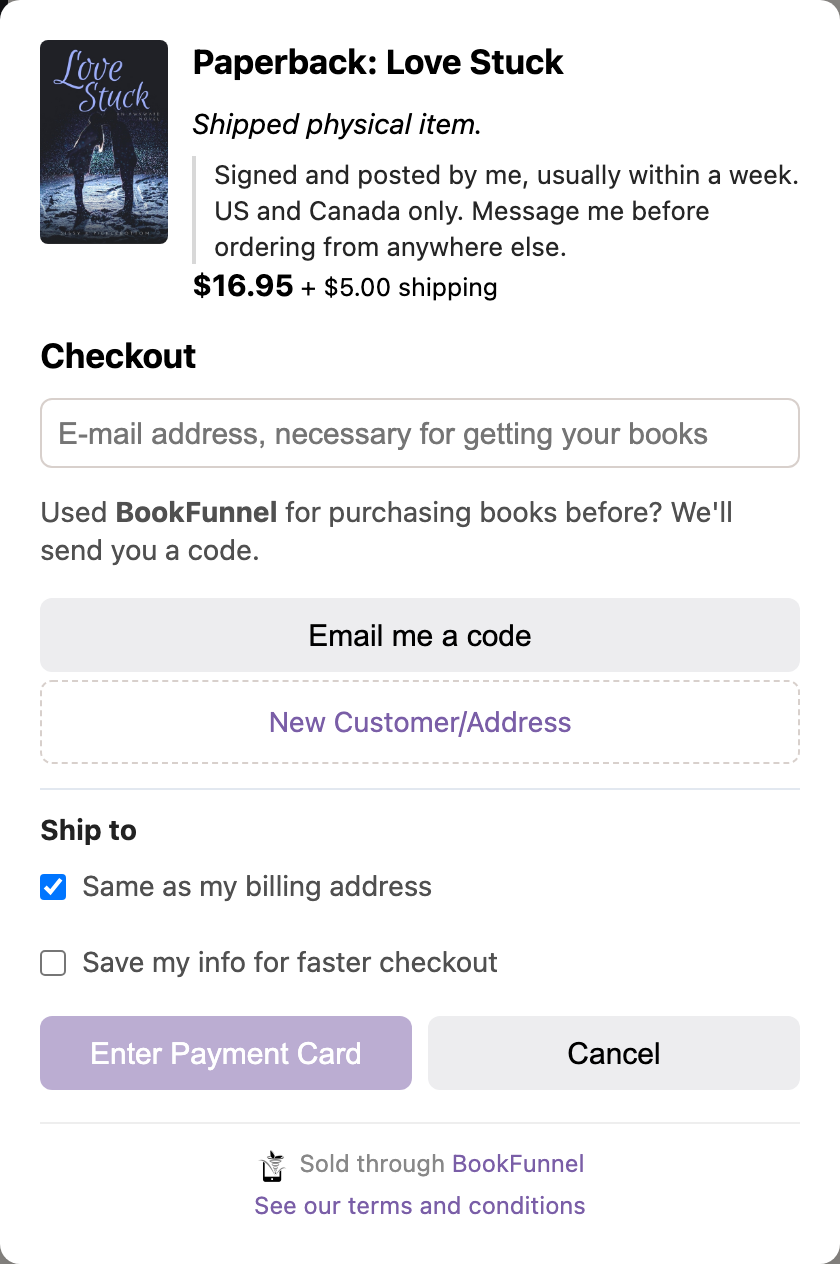
Where to post it
When a basket holds something you post, the checkout asks the buyer for a delivery address. Most buyers post to themselves, so it starts as “same as my billing address” and only opens the extra fields when they untick that. The address is shown on the order’s page in your sales view, under Ship to, laid out as a label reads. On an order that mixes your paperback with another author’s ebook, only you see it.
How it is taxed
Each line is taxed as what it is. A paperback or other printed book is taxed as a printed book, and anything else you post — a mug, a shirt, a set of bookmarks — as general merchandise, even when an ebook comes with it. Only a bundle BookFunnel delivers in full is taxed as an ebook. Where a printed book and an ebook are taxed differently, an order holding both is taxed line by line.
For a variant the automatic choice gets wrong, the variant editor in your BookFunnel dashboard is gaining a Tax category setting.
See it working
The demo store's Merchandise shelf sells four physical items — a paperback, a mug, a set of bookmarks and a shirt — through the same checkout as its books. Note what is missing on those pages compared with the ebooks: no delivery mark, and a seller note doing the work instead.