
Handling Refunds
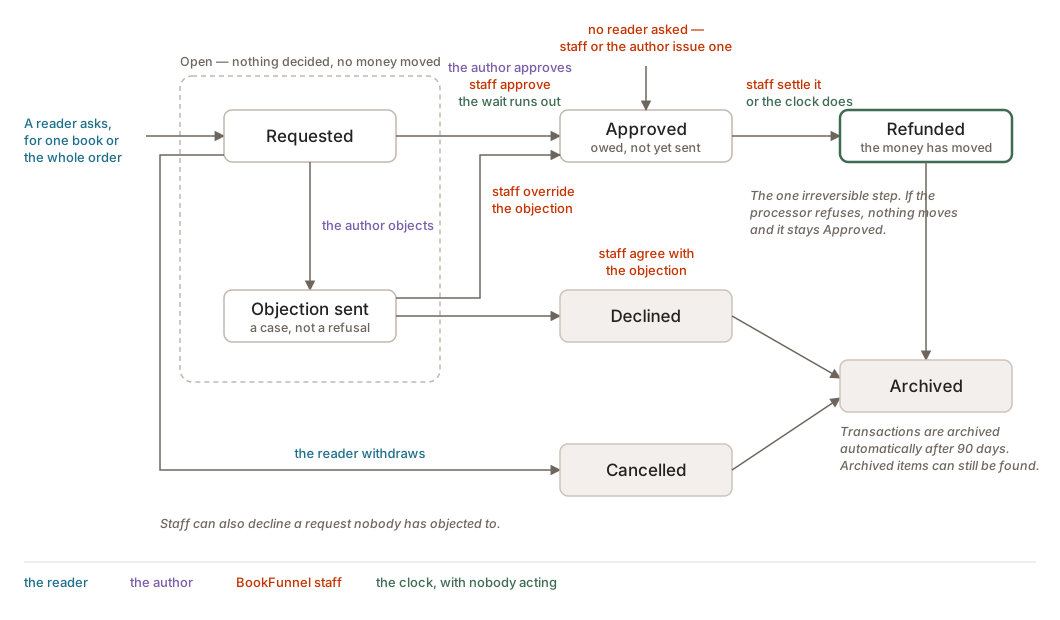
A reader asks from their own order page. The request comes to you before it comes to us, and it comes with a clock.
How a request reaches you
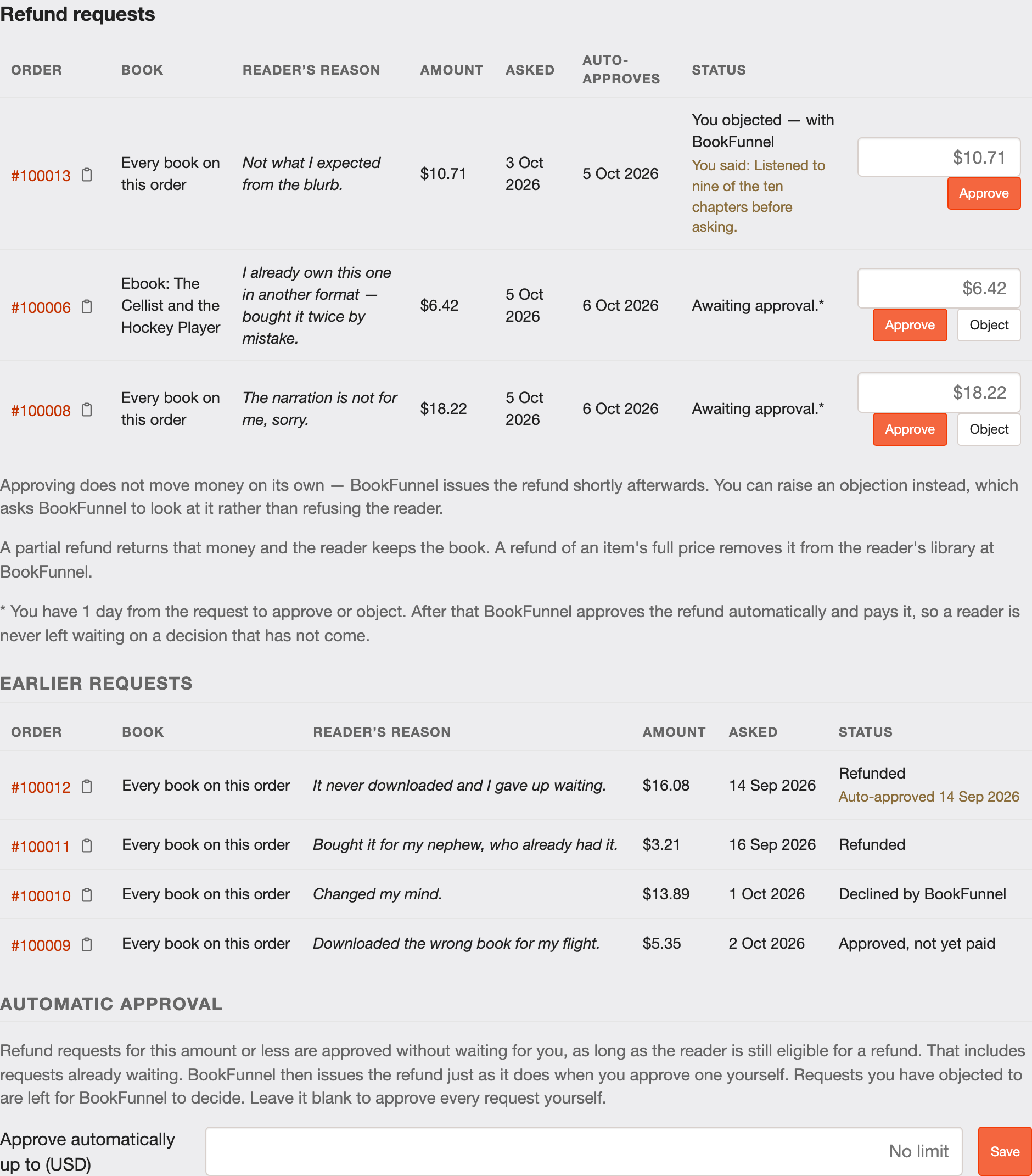
Every buyer has an order page, and on it a way to ask for a refund with a reason. That request lands in Refund Requests in your dashboard. Nothing has moved yet — no money, no e-mail to you saying it is already done.
Your two options
| Action | What happens |
|---|---|
| Approve | The refund is settled. The money goes back to the buyer and the request leaves your queue. |
| Object | You give a reason, and the request goes to BookFunnel to decide. It is a case you are making, not a refusal you are issuing — objecting does not stop the refund by itself. |
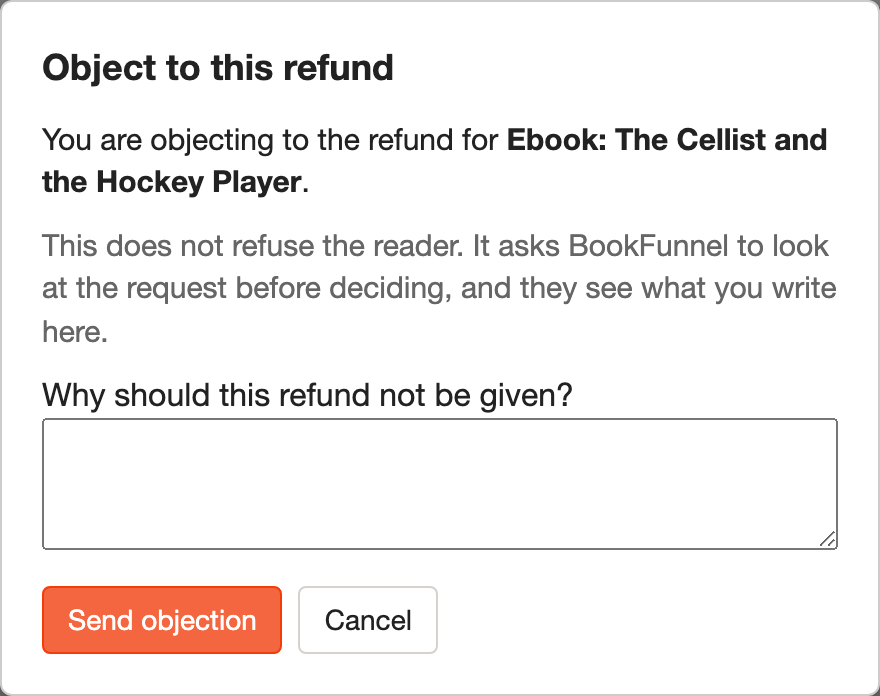
Objecting is for the cases worth a person reading: an order that looks fraudulent, a reader who has asked five times, a claim you can show is wrong. It is not for talking a reader out of an ordinary change of mind.
The clock, and what it does
Every open request shows the date it decides itself. Leave a request alone past that date and it approves automatically — the reader gets their money, and the request is marked as auto-approved rather than as your decision, so the record shows what actually happened.
This is deliberate and it is not negotiable. A refund a reader is owed must not depend on an author reading their e-mail, and "still waiting on the author" is not a state a reader should be able to be left in indefinitely.
An objection restarts the question rather than the clock: it moves to a BookFunnel decision, and that has its own deadline, shown the same way on the same row.
Why do BookFunnel admins get to override refund decisions?
This is a safety valve.
Reading the status
| Status | Means |
|---|---|
| Awaiting approval | It is yours to act on, and the date beside it is when it stops being. |
| Wait time expired: auto approved. | The clock ran out. It was refunded without you, and not against you. |
| Objection sent | You made your case; BookFunnel has it. |
| Refunded | Settled. The money is back with the buyer. |
Old requests are archived once they have been finished for a while. They are hidden rather than deleted — tick Show archived in the filters to see them again.
Approving for part of it
Approve does not have to mean all of it. Beside the button there is a box holding the amount the reader asked for — type a smaller number and that is what goes back. The reader got the ebook but the audiobook link was dead for three days: a full refund of the basket is not right, and neither is nothing.
The figure you approve is the figure that gets paid, and you can change your mind up until it settles because approving moves no money. You cannot approve more than the order has left; if you try, you are told what is left.
Refunds nobody asked for
Sometimes the right answer is to give money back before anyone complains — a batch of orders went out with two copies of the same book, say. You can issue a refund against your own order without waiting to be asked, and BookFunnel can do the same across every affected order at once.
These appear in your history as Issued by BookFunnel rather than as something you approved, because you did not. They are not work waiting on you and they never sit in your queue. Everything after that is identical: the money goes back the same way, on the same clock.
Physical products
Identical. A refunded paperback refunds the money on the same clock as a refunded ebook; getting the paperback back is a conversation between you and the buyer, and it is not something the refund waits for. If that worries you, the place to deal with it is the seller note on the product, before anyone pays — see Processing physical product orders.
Reducing them
Nearly every refund request we see is one of two things: a reader who expected a different format, or a reader who could not open what they got. The first is answered by naming the format everywhere, which the checkout now does for you. The second is Troubleshooting.